
Comprehensive Health Conditions System
64 predefined medical conditions with professional categorization and optional ICD-10 hints
FreeMedical Quadrants
Main health categories displayed in visual quadrants around each person:
- Cardiovascular - Heart disease, hypertension, stroke
- Mental/Neuro/Substance Use - Depression, anxiety, PTSD, OCD, eating disorders, epilepsy, ADHD, dementia, alcohol & drug use disorders, gambling
- Cancer - All major cancer types with visual differentiation
- Metabolic/Endocrine - Diabetes, thyroid, obesity, liver disease
Outer Ring Categories
Secondary conditions displayed in the outer ring:
- Respiratory - Asthma, COPD, pulmonary conditions
- Autoimmune - Lupus, rheumatoid arthritis, MS
- Musculoskeletal - Arthritis, fibromyalgia
- Infectious - HIV/AIDS, hepatitis, tuberculosis, COVID-19
- Congenital - Heart defects, spina bifida, Down syndrome
- Developmental - Intellectual disability, developmental delay
- Other - Hemophilia, sickle cell, cystic fibrosis
When one person has several conditions, all of them stay visible: extra conditions use free quadrants automatically (configurable), and the outer ring splits into segments.
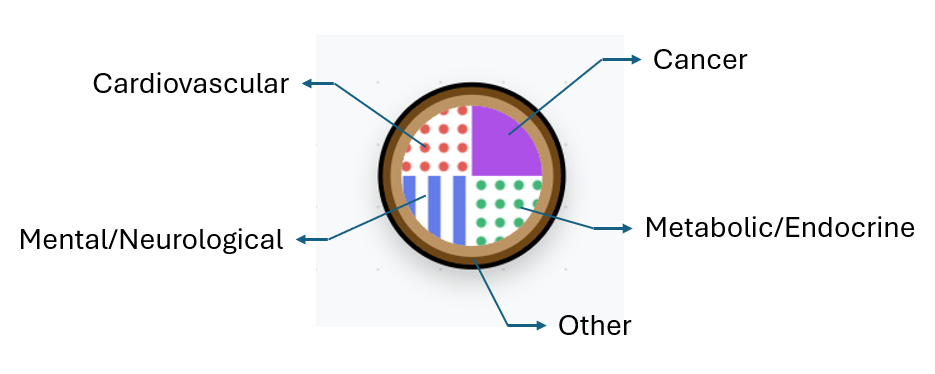
Health conditions displayed in medical quadrants with pattern differentiation
See how health conditions map to visual quadrants on person symbols
Learn more about genogram notation: Symbol Reference Chart | Glossary of Terms
Dynamic Legend System
Auto-generated visual reference that updates with your genogram
FreeAutomatic Generation
Legend automatically shows only the relationships and health conditions present in your genogram
Interactive Positioning
Drag and resize the legend panel, with position saved with your genogram file
Visual Accuracy
Legend symbols exactly match the genogram rendering for professional consistency
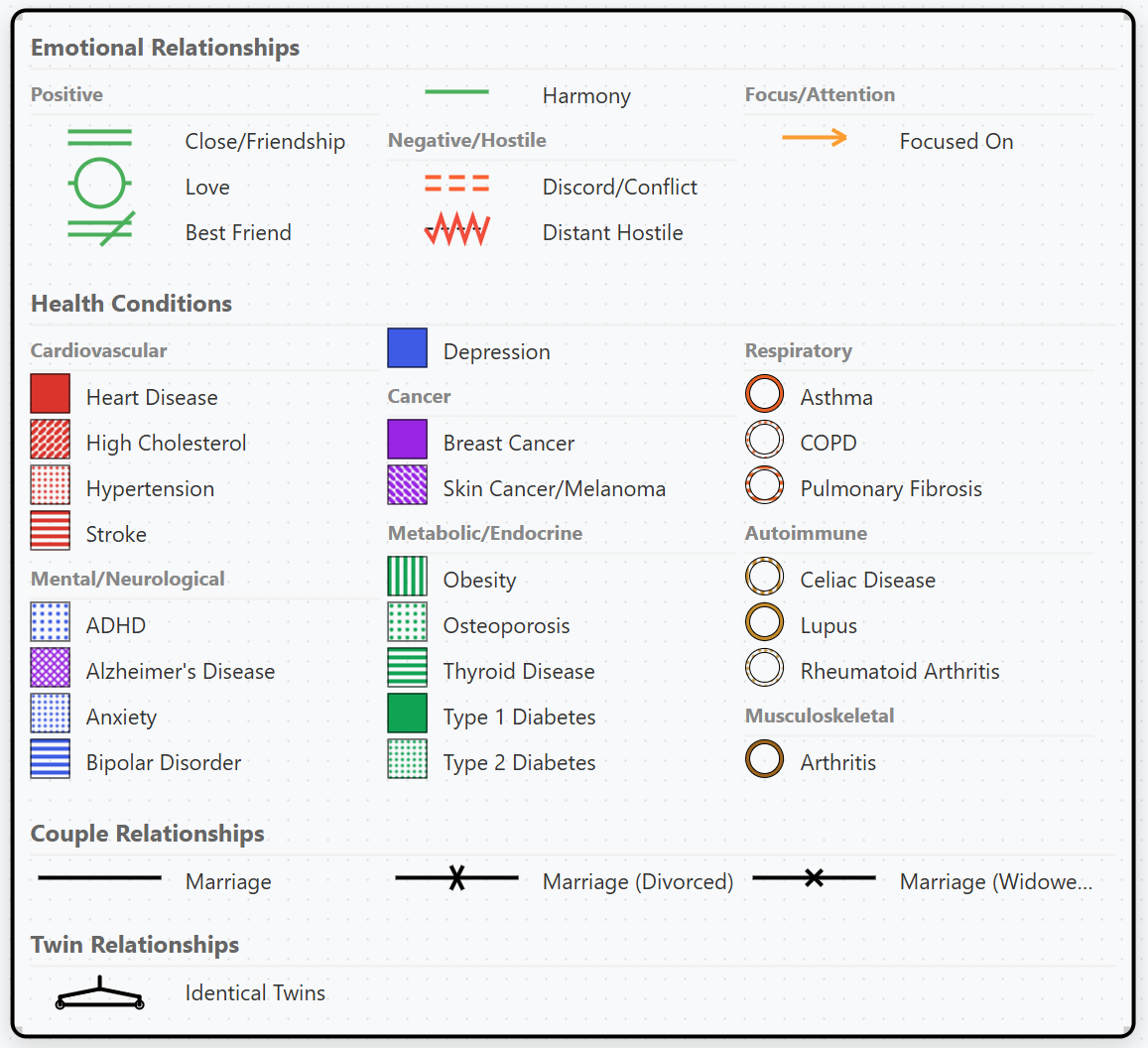
Interactive legend panel showing all active symbols and relationships
Cloud Sync
Access your genograms from any desktop with automatic synchronization
ProReal-time Sync
Changes automatically saved and synced across all your desktops
Work Anywhere
Start on your office computer, continue on your laptop at home
End-to-End Encrypted
Zero-knowledge encryption - only you can read your data, not even us
Save to the cloud, export publication-quality PDFs, PNGs, and SVGs
Professional Export
Publication-quality exports for reports, presentations, and clinical documentation
ProPDF Export
High-quality PDF files for clinical reports and printing
PNG Export
High-resolution images for presentations and documentation
SVG Export
Scalable vector graphics for professional publications
AI Genogram Builder
Generate genograms from text descriptions using AI
ProText to Genogram
Describe your family system in plain text and let AI build the genogram
Save Hours
Create complex family systems in minutes instead of hours
Edit & Refine
AI-generated genograms are fully editable for fine-tuning
Privacy-First AI
Names are automatically anonymized before AI processing, no identifiable patient data ever leaves your device
Watch AI build a genogram from a natural language description
AI Pattern Flags
Surface possible intergenerational patterns to consider
Pro BetaReads Your Genogram
Analyzes the family you've built (conditions, relationships, cutoffs, life events) for patterns that repeat across generations
Grounded in the Standard
Built on the Bowen and McGoldrick family-systems approach: condition transmission, triangles, cutoffs, anniversary clusters
Hypotheses, Not Conclusions
Every flag cites the people it is based on so you can verify it. Keep the useful ones as notes and dismiss the rest. Never a diagnosis.
Privacy-First AI
Names and note text are anonymized on your device before anything reaches the AI
Presentation Mode Beta
Turn your genogram into a guided slide deck for supervision, teaching, or client sessions
ProBuild Your Slides
Frame each slide around part of the genogram, spotlight specific people, and reveal session notes as on-canvas callouts
Present Full-Screen
Walk through your deck with smooth animated transitions between slides, ideal for supervision, peer consultation, or client sessions
Audience Captions
Add a caption to each slide so anyone watching knows exactly what they are looking at
AI First Draft
Let AI draft a first-pass deck from your case. Privacy-first: names never leave your device.
GenoPro Import Beta
Migrate from GenoPro with .gno file import
ProEasy Migration
Import your existing GenoPro files without starting over
Complete Data
Preserves relationships, health conditions, and positions
Photo Import
Extracts and imports person photographs from GenoPro files
Clinical Annotations
Attach private session notes to any person, relationship, or the genogram as a whole
FreeCategorized Notes
Tag annotations as observations, hypotheses, interventions, or follow-ups. Filter and search across all your notes.
Grouped by Entity
Annotations are grouped by person or relationship in a slide-out panel. Click any group to select that element on the canvas.
Export with References
Export to PDF with numbered badges on the genogram and a full notes appendix page. PNG and SVG exports also include numbered markers.
Attach session notes to people and relationships, export with numbered references
Life Timeline
Turn your session notes into a chronological view of a client's significant life events
FreeBuilt From Your Notes
The Life Timeline draws on the annotations you attach to a person, so a client's story comes together as you work:
- Capture losses, transitions, diagnoses, and relationship changes
- Click "Add to timeline" on any note card to turn it into a dated event
- Add events manually for anything not yet in your notes
- Every change is fully undoable
Compact & To-Scale Views
See the whole life at a glance, or switch to true time to study the spacing between events:
- Compact view groups events into an easy-to-read sequence
- To-scale view positions events by their real dates
- Smart clustering keeps crowded periods readable
- Zoom in for detail and drag to pan across the years
Flexible Dates & Overlays
Real clinical histories are rarely precise, the timeline adapts:
- Approximate dates (year, month, or day) or spans of time
- Optional developmental-stage overlays (Piaget, Erikson)
- Privacy-first AI "Suggest events from notes" (Professional), names are anonymized before any text reaches the AI
- Like all clinical notes, life events are removed from client shares
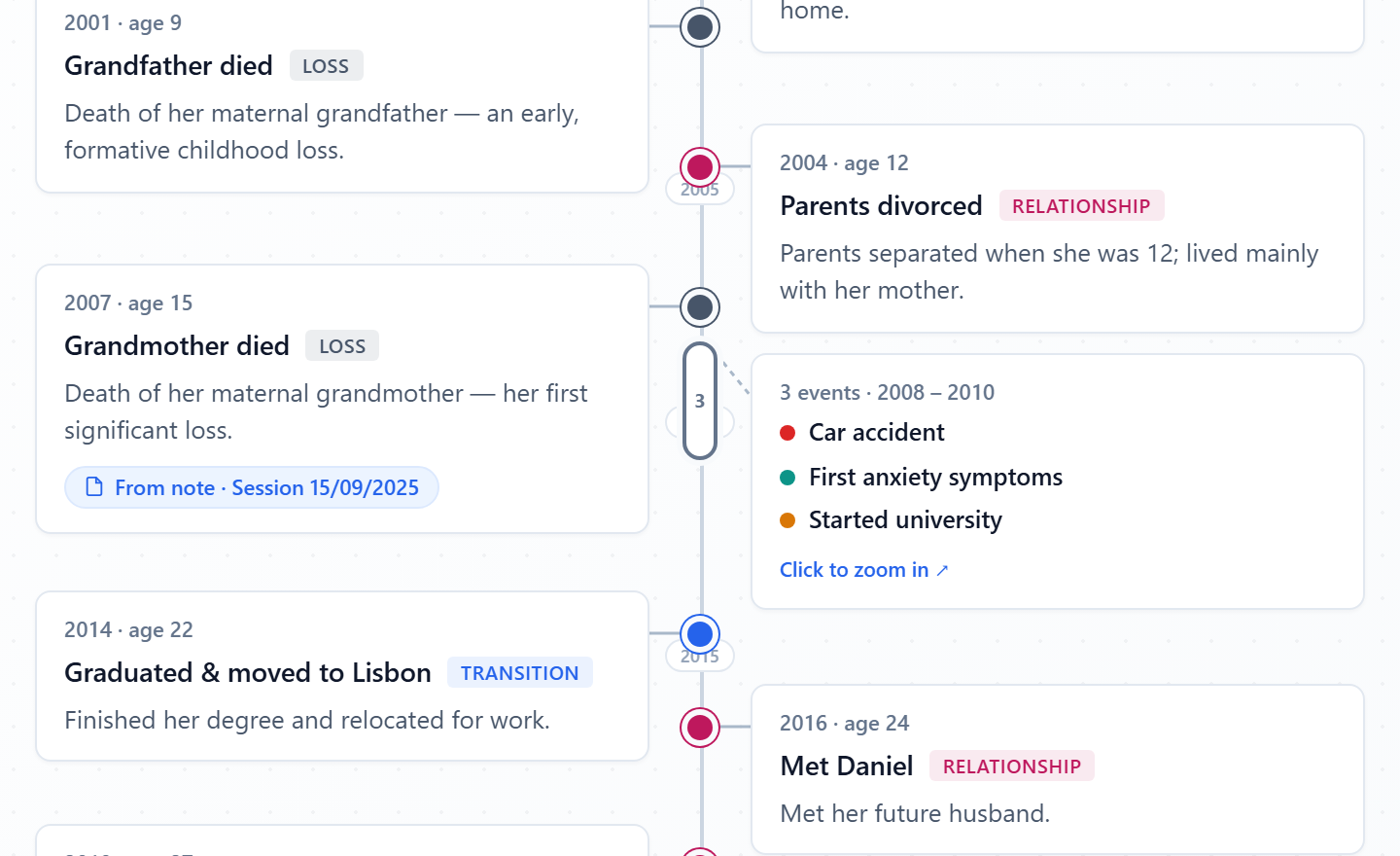
A client's life history on a to-scale timeline, with Piaget developmental-stage overlays and events linked back to the session notes they came from.
Professional Sharing
Share genograms securely with clients, peers, and supervisors
ProClient Sharing
Share a clean, read-only view with clients. Clinical notes and annotations are automatically removed. Clients can submit encrypted feedback.
Peer Consultation
Share with colleagues for case consultation. Names are replaced with role labels and ages converted to ranges. You control which fields are anonymized.
Supervisor Review
Supervisors can view the genogram and add annotations anchored to specific people or relationships. Accept or dismiss annotations with one click.
End-to-End Encryption
All shared data is encrypted in your browser before leaving your device. Optional password protection and expiring links (1–30 days).
Share genograms with clients, peers, and supervisors, with automatic anonymization
Interactive Canvas
Smooth navigation and manipulation of complex family systems
FreeZoom & Pan
Navigate large family trees with precision:
- Mouse wheel zoom for detailed work
- Click and drag to pan across the canvas
- Zoom levels from overview to detail editing
- Smooth, responsive canvas operations
Drag & Drop
Intuitive positioning and layout:
- Drag people to reposition family members
- Relationships automatically adjust
- Visual feedback during operations
- Precise positioning with grid alignment
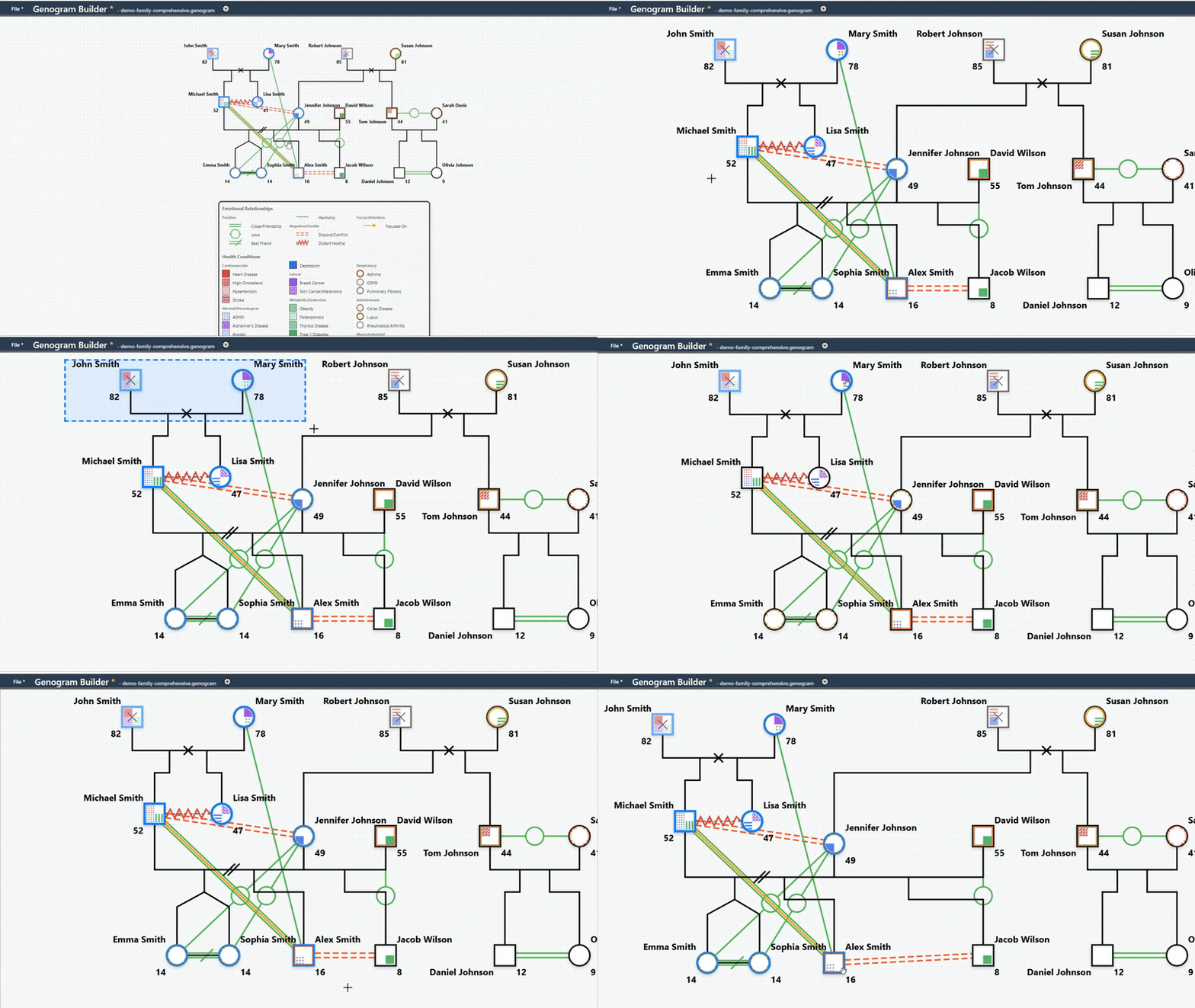
Animated demonstration of zoom, pan, and drag functionality
Advanced Relationship System
The complete McGoldrick 4th edition notation, plus your own custom types
FreeCouple Relationships
- Formal: Marriage, engagement, union in fact
- Informal: Dating, casual, one-night stand, love affair
- Modifiers: Separation, divorce, widowed
- Visual hierarchy: Formal (thick) vs informal (thin) lines
Family Connections
- Parent-child relationships
- Twin relationships (identical/fraternal)
- Adoption and step-relationships
- Multi-generational connections
Emotional Dynamics
- 30 types covering all 14 McGoldrick 4th ed. interactional patterns
- Love, harmony, close friendship, and fused relationships
- Discord, hostility, cutoff, and cutoff repaired
- Abuse (physical, emotional, sexual), caretaker, and focused-on lines with standard arrowheads
Custom Types Pro
- Define your own named relationship lines (e.g. attachment styles)
- Build from line count, style, width, zigzag or wave, arrowheads, and midpoint symbols
- Automatic legend entries under your name for them
- A built-in check keeps custom lines distinct from standard notation
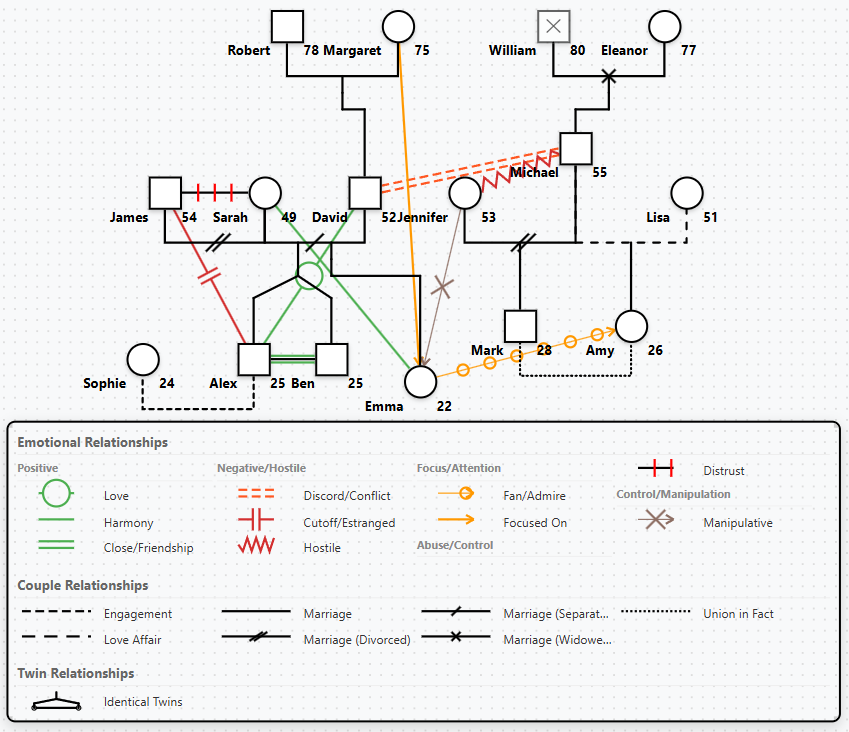
Professional genogram notation for all relationship types
Every relationship type used in family therapy, couple, emotional, and parent-child
Inclusive Gender Notation
Represent every family member accurately and respectfully
FreeModern Clinical Symbols
Following McGoldrick, Gerson & Petry (4th ed.):
- Non-binary: McGoldrick's modified gender symbol (a dome combining square and circle), selectable like any other gender
- Unknown gender: Diamond with a "?" inside
- Transgender: Standard shape-in-shape notation, with the outer shape always showing lived gender
- Identity labels: Free-text identity in the client's own words, shown under the name
Faithful To The Standard
Drawn exactly as McGoldrick's 4th edition specifies:
- A transgender person is drawn by their lived gender; the outer shape always shows who they are
- Record a gender history per person to add the standard inner shape when clinically relevant
- The dynamic legend explains every symbol automatically on canvas and in exports
- Everything works in PDF/PNG/SVG exports and the AI builder
See the full notation: Symbol Reference Chart | Live Symbols Showcase
Visual Pattern Differentiation
Clear visual distinction for health conditions and symbols
Free13 Unique Patterns
Solid fills, dots, lines, diagonals, cross-hatch, chevron, brick, wave, and grid patterns ensure visual clarity even when printed in black and white.
Color Coding
Each medical category has its own color family (red for cardiovascular, blue for mental health, etc.) with pattern variations for individual conditions.
Professional Standards
Follows established genogram conventions while adding modern enhancements for complex medical information display.
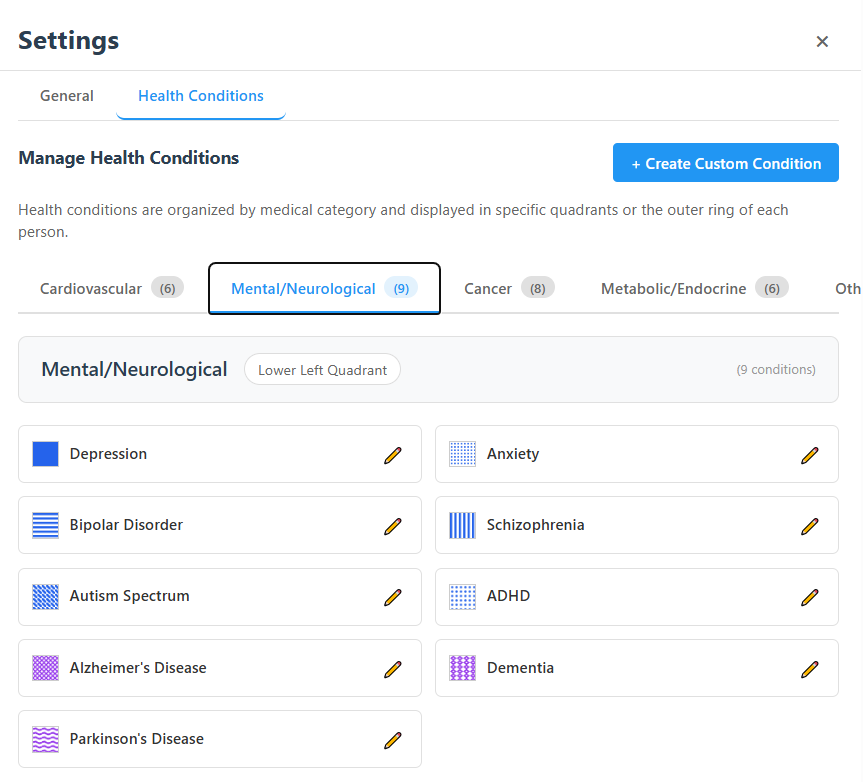
Visual patterns ensure clarity in complex medical genograms
Custom Health Conditions & Libraries
Create specialized conditions for your practice and reuse them everywhere
ProColors & Patterns
An 11-color clinical palette and 21 fill patterns for clear visual differentiation, plus an optional ICD-10 code on every condition
Any Category
Place custom conditions in any of the 11 medical categories, quadrants or outer ring
Shareable Libraries
Export your condition set as a library file and import it into any genogram, or hand it to a colleague so the whole team uses one notation
Advanced Bulk Editing
Efficient editing of multiple family members simultaneously
FreeChange Tracking
Visual indicators show which fields will be modified, preventing unintended changes to family member data.
Selective Application
Only modified fields are applied during bulk operations, preserving existing data integrity.
Multi-Selection
Select multiple family members across generations for efficient batch updates.
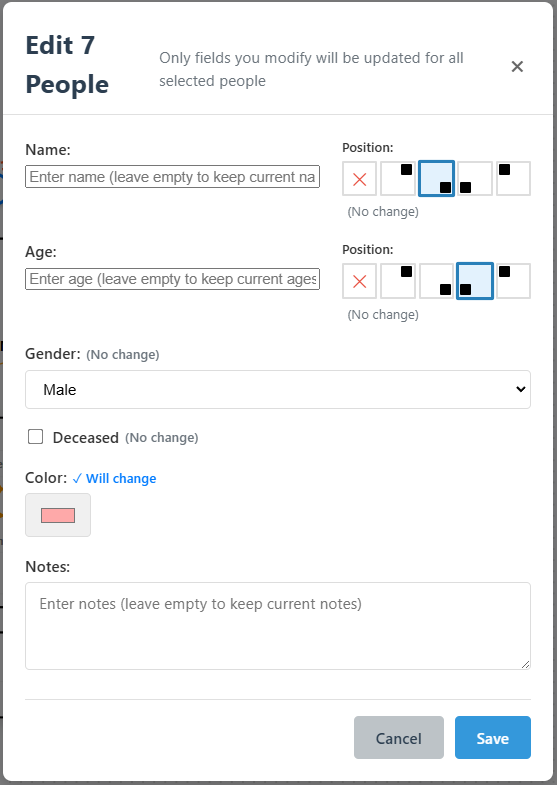
Bulk editing with change tracking and selective field updates
Professional Applications
Family Therapy
Comprehensive family system analysis with detailed health history tracking and relationship dynamics visualization.
Psychological Assessment
Mental health pattern identification across generations with support for complex psychological conditions.
Medical Research
Hereditary condition tracking with detailed medical categorization and visual pattern analysis.
Clinical Training
Educational tool for teaching family systems theory with professional-grade notation and examples.
Psychology students get full Professional features free with a .edu email
Start Creating Professional Genograms Today
Free forever for core features. Upgrade to Pro for cloud sync, exports, and AI.