
A real builder, not a diagram template
Generic diagram tools (Lucidchart, Canva, Miro) let you draw shapes. They don't know what a genogram is. You spend half your time aligning rectangles and re-drawing parent-child lines by hand.
WebGeno is a purpose-built genogram builder. It knows that:
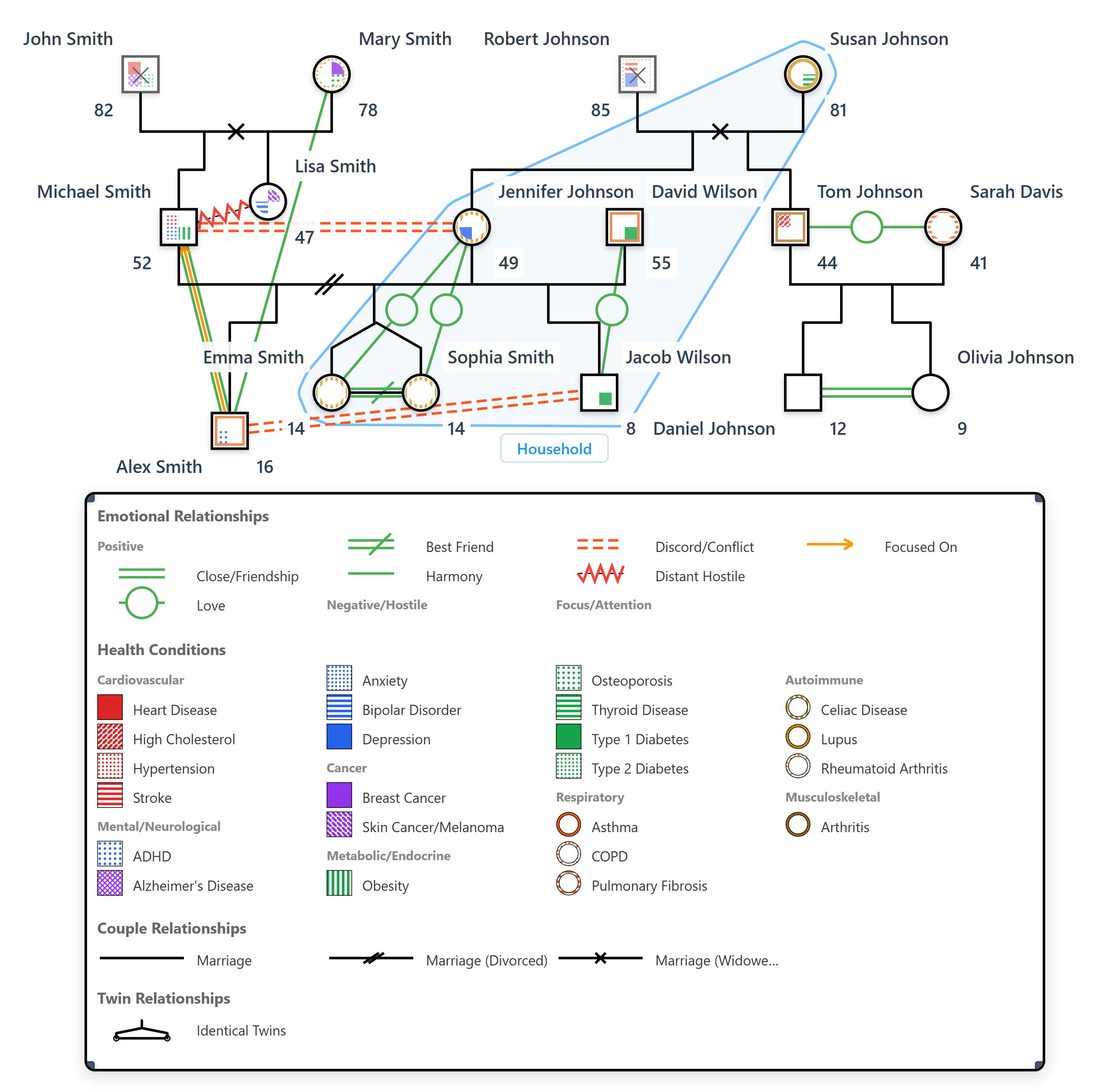
- People and relationships have rules couples, divorces, adoptions, twins, miscarriages all auto-route correctly
- Health conditions need visual patterns 47 conditions render as standardized fills and quadrants, not free-text labels
- Emotional relationships are first-class close, conflicted, cutoff, fused, all 16 types with the correct line style
- The legend matters auto-generated, always reflects what's actually on the canvas
The result: a genogram you can build in minutes that's actually accurate by clinical standards. See our genogram symbols reference for the full notation system, or check the visual symbols guide for clinical context.
Build a genogram in 4 steps
Add the index person
Click the canvas to drop your first family member — the person at the center of the assessment. WebGeno marks them with the standard double-outline symbol so they're clearly identifiable.
Build family structure with relationship lines
Select two people and pick a relationship type — couple (married, divorced, separated, engaged, cohabiting), parent-child, sibling, twin. WebGeno auto-routes the lines and lays out generations correctly.
Layer health conditions and emotional dynamics
Double-click anyone to add health conditions from the 47-condition library. Each gets a distinct visual pattern. For emotional relationships, select two related people and pick from 16 standard types — the line style updates automatically.
Save, export, share
Free users save locally as .wgeno files and re-open anytime. Pro adds PDF/PNG/SVG export, cloud sync across devices, and end-to-end encrypted client sharing with three share modes (client, peer, supervisor).
What makes WebGeno a builder, not just a drawing tool
Built for the people who actually use genograms — therapists, social workers, students
AI editor (Pro)
Describe a family in plain English and the AI populates the canvas. Then refine by hand — the AI is a starting point, not a black box.
Auto-layout
Add a child and the generation line snaps into place. Move a couple and their kids follow. You spend time on the family, not on alignment.
64 health conditions
Cancer, heart disease, depression, schizophrenia, addiction (alcohol, drugs, tobacco), dementia, and more. Each with its own quadrant or fill pattern.
30 emotional relationships
Close, conflicted, distant, cutoff, fused, love-conflict, abuse, sexual — the full clinical vocabulary, with the right line style for each.
Dynamic legend
Only shows symbols you've actually used. Update the genogram, the legend updates with it. No manual upkeep.
End-to-end encryption (Pro)
Cloud sync and client sharing both use AES-256-GCM. Genograms are encrypted on your device before they leave it. GDPR-compliant.
GenoPro import (Pro)
Bring your existing .gno files over in one upload. See the GenoPro alternative guide for the full migration steps.
PDF/PNG/SVG export (Pro)
Three export formats for three use cases — PDF for client files, PNG for slide decks, SVG for publications and supervision documents.
Who's building genograms with WebGeno
Therapists & counselors
Map family dynamics in real time during sessions, or build outside session and bring the genogram in. See genogram software for therapists.
Social workers
Build a family-systems map for every case file. Encrypted case documentation and family-services workflows. See genogram software for social workers.
Students
Psychology, social work and nursing students learn genograms by building them. Verified students get free Pro access.
Family researchers
Personal family-history projects, intergenerational research, cultural lineage work — the builder handles them all the same.
What's free, what's Pro
The full builder canvas is free forever. Pro adds the productivity layer.
| Capability | Free | Pro ($12/mo, $99/yr) |
|---|---|---|
| Full drag-drop canvas | ||
| Unlimited family members | ||
| 64 health conditions | ||
| 30 emotional relationships | ||
| Dynamic legend | ||
| Photos with in-app cropping | ||
Local file save (.wgeno) | ||
| AI editor (build from description) | ||
| Cloud sync across devices | ||
| PDF, PNG, SVG export | ||
| Encrypted client sharing | ||
GenoPro .gno file import | ||
| Custom health conditions |
Students: Verified psychology, social work and nursing students get free Pro access. Learn more
Frequently Asked Questions
How long does it take to build a genogram with WebGeno?
A simple three-generation genogram takes about 5–10 minutes once you know your way around the canvas. Complex multi-generational families with detailed health conditions and emotional relationships typically take 30–60 minutes. With the Pro AI editor, you can describe a family in plain language and have the canvas populated in under a minute, then refine details by hand.
Can the builder generate a genogram from a description?
Yes, with the AI editor on the Pro plan. Type something like "three-generation family, grandmother had breast cancer, two grandsons close to mother, cutoff from father" and the AI builds the canvas. You can keep iterating in plain language or switch to manual drag-drop at any point.
Does the builder support standard clinical notation?
Yes. WebGeno uses Bowen and McGoldrick standard symbols — squares for men, circles for women, double outlines for the index person, with full couple and parent-child relationship lines. The 30 emotional relationship types and 64 health condition patterns also follow widely-taught clinical conventions used in family therapy and social work training.
Can I edit a built genogram later?
Yes. Save the file locally (free) or to the cloud (Pro) and re-open it anytime. Every change is undoable — unlimited undo/redo history is preserved per file. Pro users can also work on the same genogram across multiple devices via cloud sync.
How do I share what I've built with clients or supervisors?
Pro users can generate end-to-end encrypted share links with optional password protection and expiry dates. Three share modes are supported — client view (clinical annotations stripped), peer review (full canvas), and supervisor (with annotation feedback workflow). Free users can export as PDF, PNG or SVG (Pro) or take screenshots from the canvas.
Can I import an existing genogram from GenoPro?
Yes, via GenoPro file import on the Pro plan. WebGeno reads GenoPro's native .gno format directly — individuals, family units, emotional relationships and embedded photos transfer in one upload. See our GenoPro alternative guide for a full step-by-step migration walkthrough.
Build your first genogram
The whole canvas is free. AI editor, cloud sync and export when you want them.
No account required. Works in your browser.