
What you're about to create
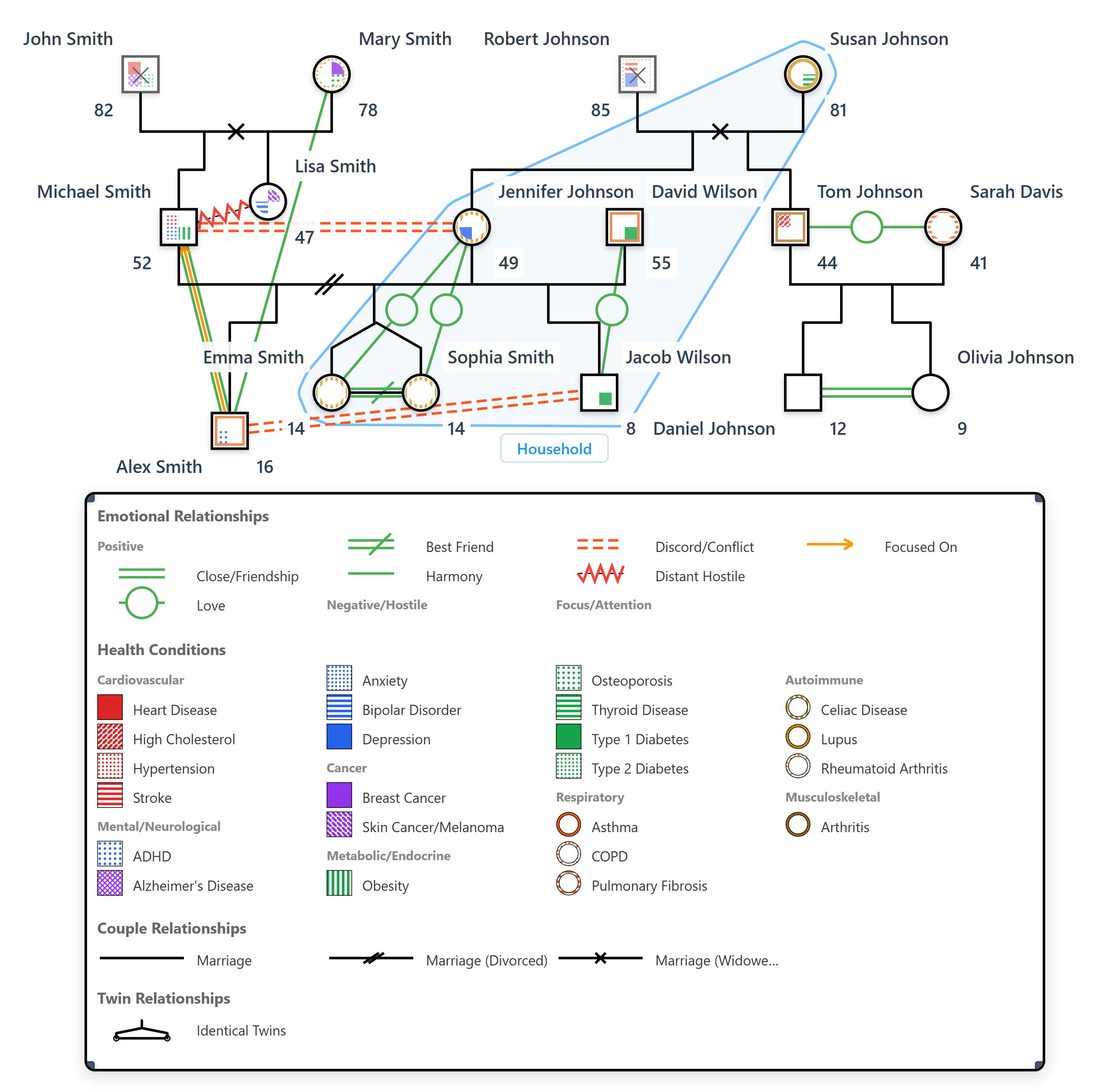
A genogram is a family diagram that adds clinical depth on top of a standard family tree. Where a family tree just shows who's related to whom, a genogram visualizes:
- Family structure partners (married, divorced, separated), parents and children, siblings, twins, adoptions
- Health conditions 47 standardized clinical conditions with their own visual patterns
- Emotional relationships close, conflicted, distant, cutoff, fused — 16 types in all
- Generational patterns recurring behaviors, traumas, life events that travel down the family
WebGeno builds genograms using standard Bowen and McGoldrick notation — the same symbols taught in family therapy and social work programs. See our genogram symbols reference for the full notation system.
Create your genogram in 5 steps
Open the app and add the index person
Click the canvas to add the first family member — the person whose family you're analyzing. Choose male, female or unknown gender; WebGeno marks them with a double-outline symbol so the index person is always clear.
Add immediate family
Add the index person's parents, siblings, partner and children. Select two people and pick a relationship type — couple, parent-child, sibling — and the lines auto-route correctly. Don't worry about layout; WebGeno snaps each generation into place.
Expand to grandparents (and further if needed)
A standard clinical genogram covers three generations. Add the parents' parents and any aunts, uncles or cousins relevant to the analysis. For genetic counseling or family research, you can go four or five generations deep.
Add health conditions and emotional patterns
Double-click any person to add health conditions from the 47-condition library. Each shows as a distinct visual pattern on the symbol. For emotional relationships (close, conflicted, cutoff, fused), select two related people and pick from 16 standard types.
Save or export
Save locally as a .wgeno file (free) and re-open anytime. Pro users can also sync to the cloud across devices and export as PDF, PNG or SVG for inclusion in client files, supervision documents or publications.
Don't want to start from scratch?
Open a worked example and modify — handy for learning the symbols or teaching genograms in a class
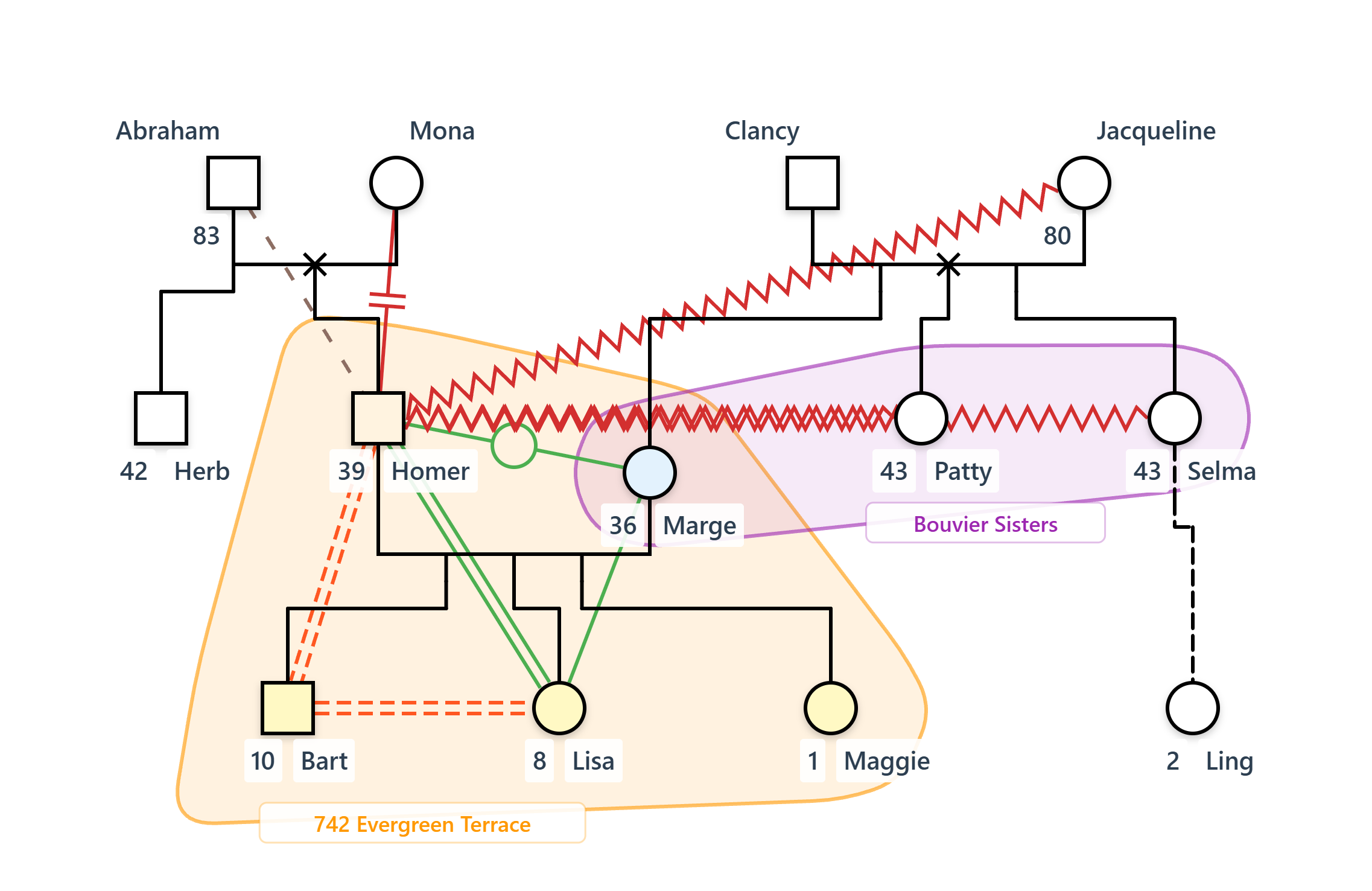
The Simpsons
Three-generation family with emotional relationships and health conditions.
Open Example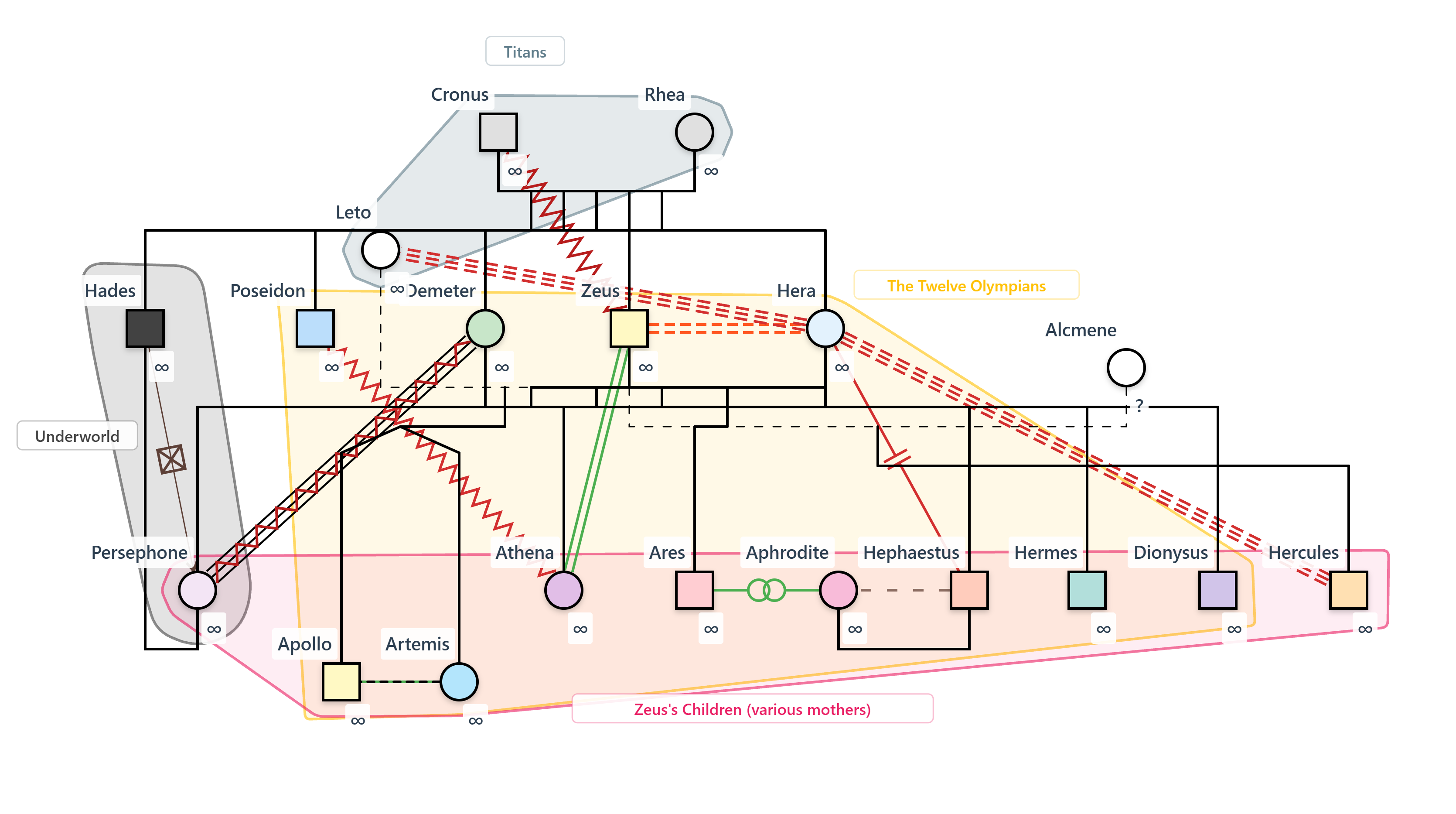
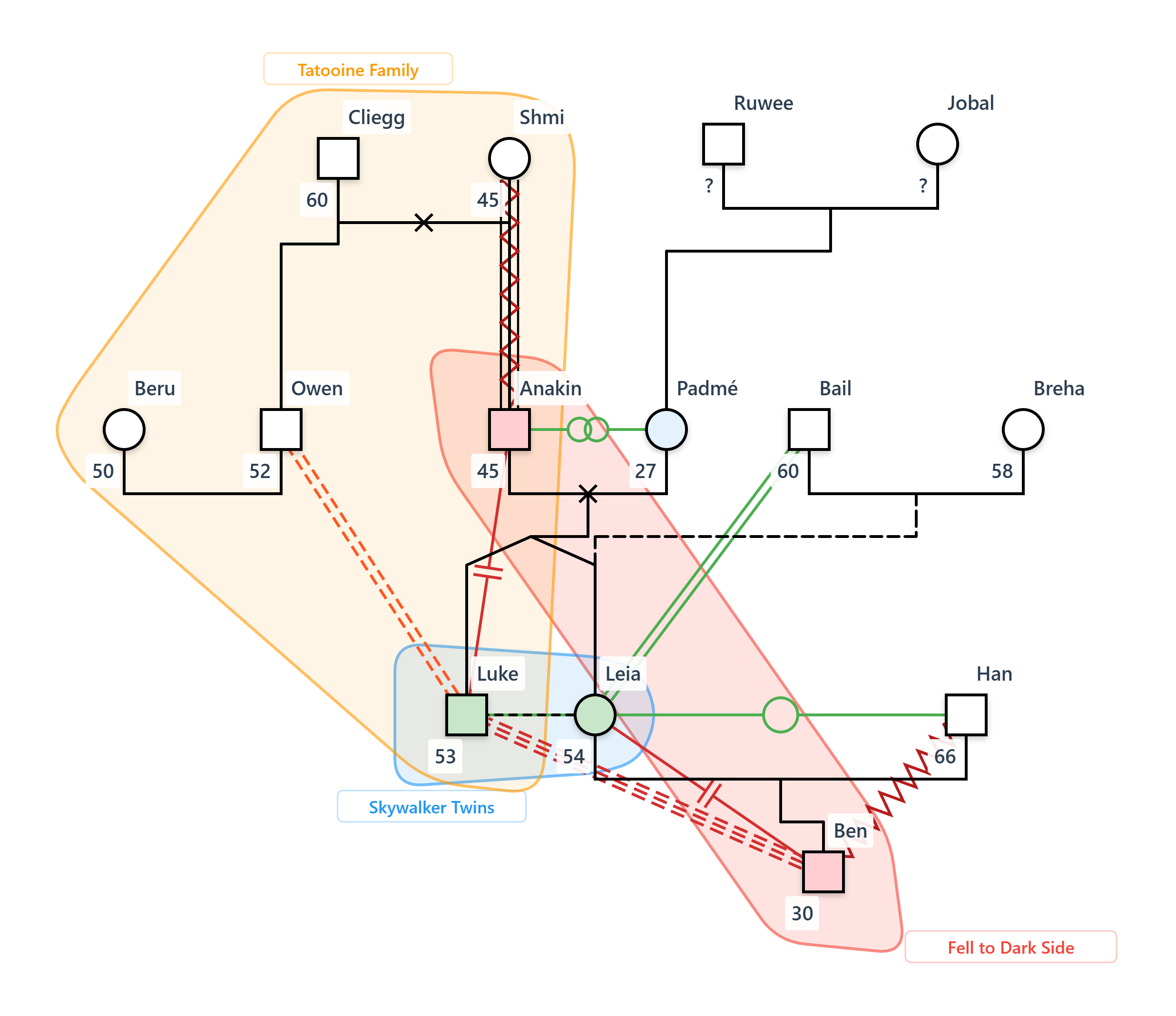
Star Wars
The Skywalker family across generations with health conditions and relationships.
Open ExampleBuilt for fast creation
No fighting with shape tools, no manual layout — just family
Auto-layout
Add a child and the generation line snaps into place. Move a couple and their kids follow. You spend time on the family, not on alignment.
AI editor (Pro)
Describe the family in plain English and let the AI populate the canvas. Then refine by hand — the AI gives you a starting point, not a black box.
64 health conditions
Cancer, heart disease, depression, schizophrenia, addiction, dementia, and more — each with its own quadrant or fill pattern. Custom conditions in Pro.
30 emotional relationships
Close, conflicted, distant, cutoff, fused, love-conflict, abuse, sexual — the full clinical vocabulary with the right line style for each.
Unlimited undo/redo
Made a mistake? Press Ctrl+Z. Every change is reversible — add people, remove people, change relationships, all undoable.
Photos
Add a photo to any person and crop in-app. Useful for genealogy projects or for clients who want a more personal genogram.
Local file save
Save genograms as .wgeno files on your computer. Re-open anytime. Your data stays on your device until you choose to sync.
PDF/PNG/SVG export (Pro)
Three export formats for three use cases — PDF for client files, PNG for slide decks, SVG for publications and supervision documents.
Who creates genograms with WebGeno
Therapists & counselors
Create a clinical genogram during the assessment session, then keep updating it as the client work progresses. See genogram software for therapists.
Social workers
Create a family-systems map for every case file. Encrypted case documentation and family-services workflows. See genogram software for social workers.
Students
Psychology, social work and nursing students learn by creating genograms. Verified students get free Pro access.
Family researchers
Personal family-history projects, intergenerational research, cultural lineage work — the canvas handles them all the same.
What's free, what's Pro
Create as many genograms as you want, free forever. Pro adds the productivity layer.
| Capability | Free | Pro ($12/mo, $99/yr) |
|---|---|---|
| Create unlimited genograms | ||
| Unlimited family members per genogram | ||
| 64 health conditions | ||
| 30 emotional relationships | ||
| Open example genograms | ||
| Photos with in-app cropping | ||
Local file save (.wgeno) | ||
| AI editor (create from description) | ||
| Cloud sync across devices | ||
| PDF, PNG, SVG export | ||
| Encrypted client sharing | ||
GenoPro .gno file import | ||
| Custom health conditions |
Students: Verified psychology, social work and nursing students get free Pro access. Learn more
Frequently Asked Questions
Where should I start when creating a genogram?
Start with the index person — the person whose family you're analyzing. Add them to the canvas first, then build outward: parents, then siblings and partner, then children, then grandparents. WebGeno marks the index person with a double-outline symbol so it's clear who the genogram is centered on.
How many generations should my genogram include?
A standard clinical genogram covers three generations — the index person, their parents, and their grandparents. For genetic counseling or complex family work, you may include four or five generations. For a personal-reflection genogram, three is usually enough.
Do I need to know every health condition before I start?
No. Start with what you know and add details as you learn them. WebGeno saves your work as you go, so you can come back and add health conditions, dates or relationships later. Many people create a first draft from memory, then refine it after talking to family members.
Can I start from a template or example?
Yes. WebGeno includes ready-made example genograms (The Simpsons, Greek Gods, Star Wars Skywalkers) that you can open as a starting point and modify. Useful for learning the symbols by example or for teaching genogram creation in a class setting.
Should I create a genogram by myself or with the family?
Both work. In clinical practice, creating a genogram with the client during session reveals the family story alongside the structure. For personal reflection or research, creating on your own first and verifying with family members afterwards is also common.
What if I make a mistake while creating the genogram?
Press Ctrl+Z (or Cmd+Z on Mac). WebGeno has unlimited undo and redo — every change is reversible, including adding or removing people, relationships, health conditions and notes. You can experiment without fear of breaking the file.
Ready to create your genogram?
Open the canvas. Add the index person. You'll be looking at a real genogram in under five minutes.
Free forever for core features. No account required.